

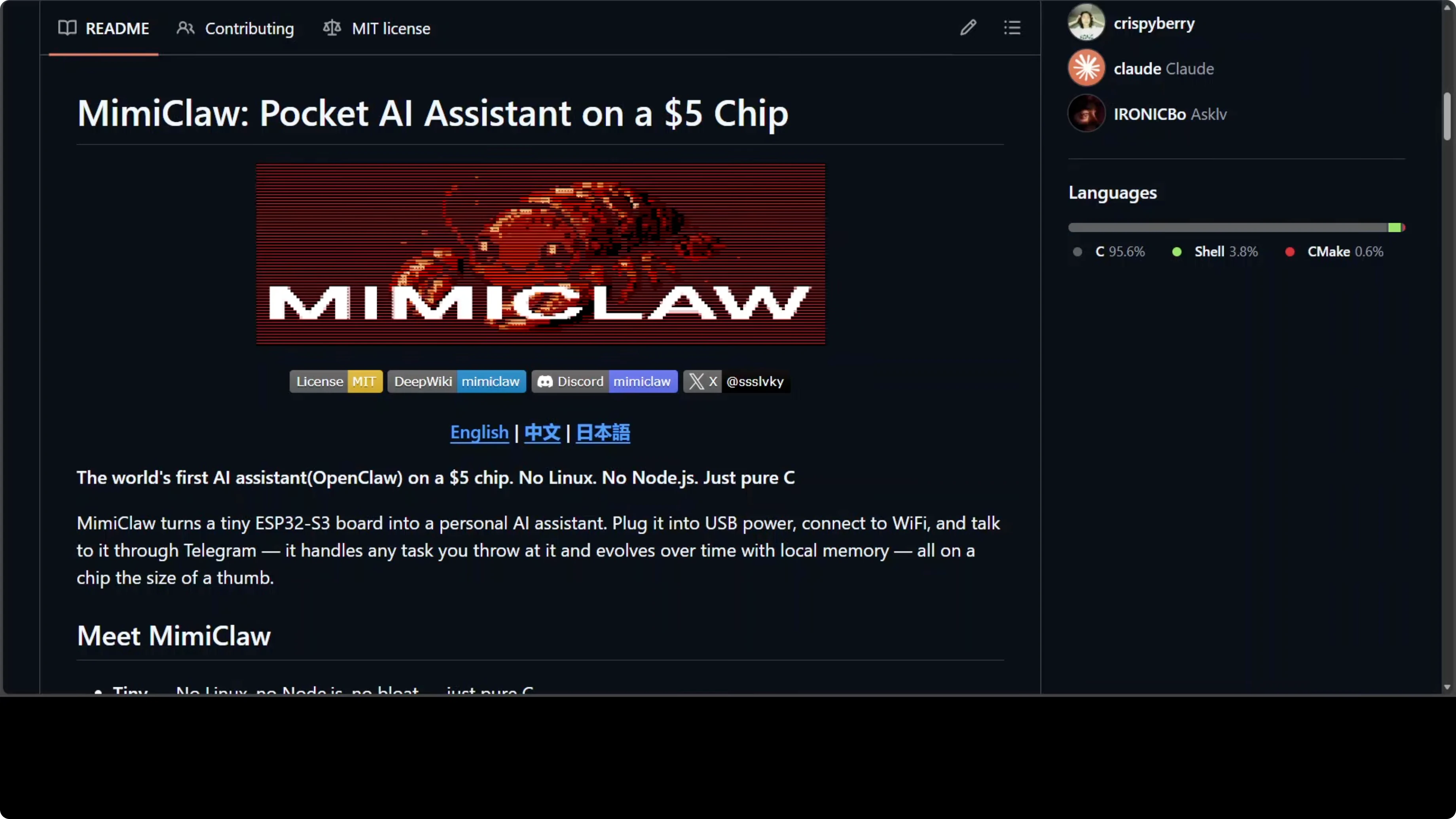
We've covered installing OpenClaw on Mac, Linux, AWS, Hostinger VPS - all conventional systems with operating systems and gigabytes of RAM. MimiClaw throws all of that out the window.
It runs OpenClaw on a $5 ESP32 microcontroller with no operating system at all. Pure C code on bare metal. The entire AI agent loop - LLM calls, tool execution, memory, heartbeats, cron jobs - runs on a chip the size of your thumb.
This is the most radical member of the OpenClaw family.
Why Run AI Agents on a Microcontroller?
Before we dive into how it works, the obvious question: why would you do this?
Power efficiency. An ESP32-S3 running MimiClaw sips about 0.5 watts. That's an always-on AI assistant you can run off a USB power bank for days.
Portability. The entire setup fits in your pocket. No laptop, no cloud server dependencies (except for the LLM API itself). Just Wi-Fi and a Telegram bot.
Cost. A $30-40 dev board. No monthly VPS bills. No need for expensive hardware.
Learning. If you want to understand how AI agents work at the lowest level - memory management, task scheduling, network I/O without an OS - this is the deepest rabbit hole.
Is it practical for production workloads? Probably not. But it's fascinating, and it proves the OpenClaw architecture is flexible enough to run anywhere.
How It Works: Two Cores, Zero OS
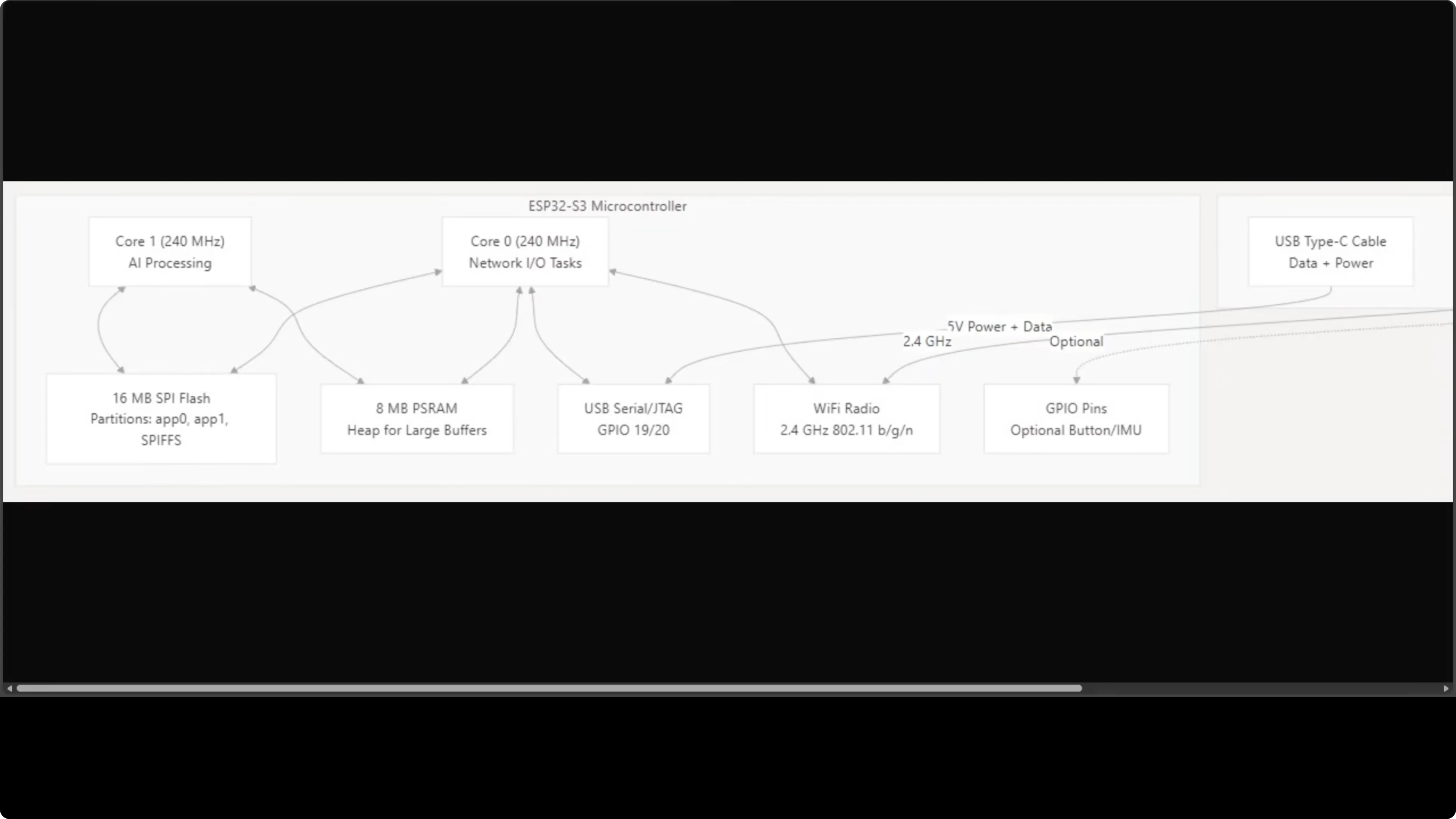
MimiClaw runs on an ESP32-S3 with two 240 MHz cores. Here's the division of labor:
Core 0: Network stack - Wi-Fi polling and Telegram communication Core 1: AI processing - the agent loop, LLM calls, tool execution
They share 16 MB of SPI flash storage and 8 MB of PSRAM (extended RAM for large buffers). Everything your AI assistant needs fits on a board smaller than a credit card.
Three FreeRTOS tasks run concurrently:
- Agent loop (Core 1)
- Telegram polling (Core 0)
- Outbound message dispatcher (Core 0)
This split keeps I/O responsive while the agent processes LLM responses. No context switching overhead from a full OS.
Need AI integration for your business?
Get in touch for a consultation on implementing AI tools and automation in your stack.
Memory Layout: 8 MB PSRAM Does the Heavy Lifting
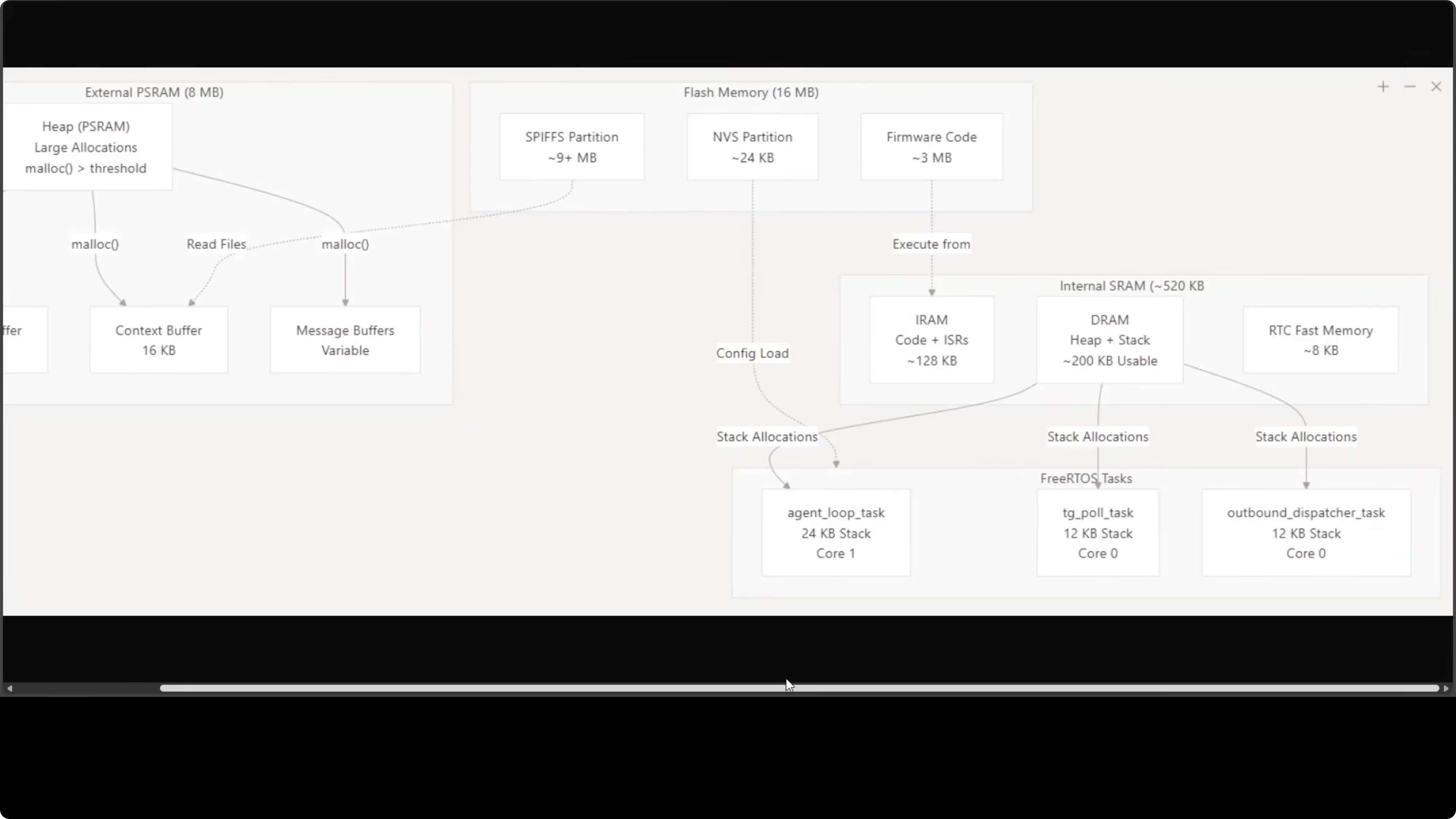
The 8 MB external PSRAM handles the working set:
- LLM stream buffer (for Claude/GPT responses)
- Context buffer (conversation history)
- Message buffers (Telegram I/O)
That keeps everything in memory without paging or swapping. No filesystem caching, no virtual memory. Just buffers in RAM.
The 16 MB flash holds firmware code plus persistent data:
- Conversation history
- Memory files
- Skills
- Cron jobs
It's remarkably tight. Every byte has a job.
Flash Partitions: Where Everything Lives
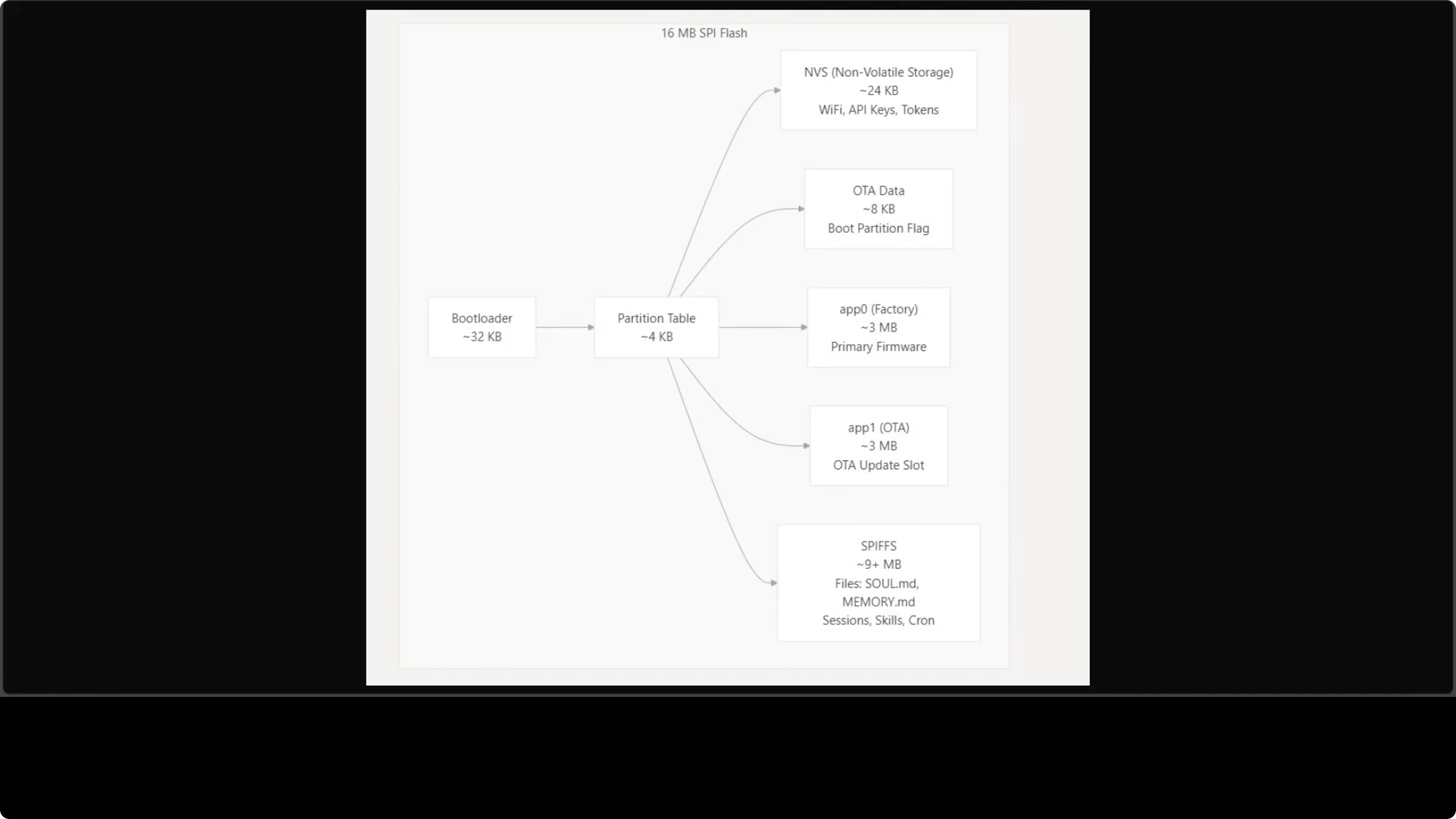
Flash storage is carefully partitioned:
NVS (24 KB): Non-volatile storage for Wi-Fi credentials, API keys, Telegram tokens. Configured via serial CLI.
app0 (3 MB): Primary firmware partition app1 (3 MB): OTA update slot (over-the-air updates via Wi-Fi)
SPIFFS (9+ MB): The on-device filesystem. This is where agent files live - skill.mmd, memory.mmd, conversation logs, cron jobs. Everything persists across reboots.
After the first USB flash, you never need to plug in a cable again. All updates happen over Wi-Fi.
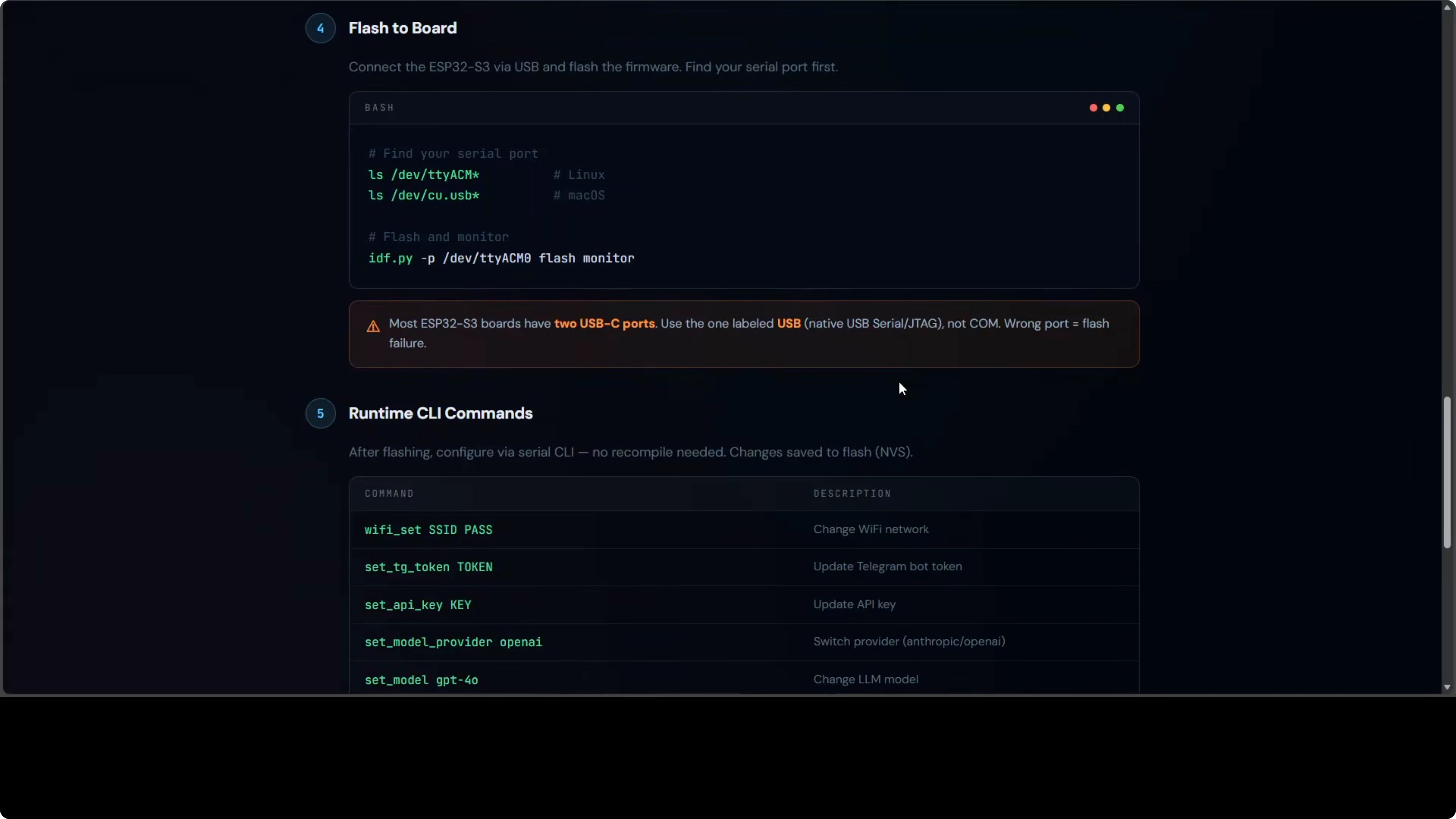
USB Port Gotcha (Don't Skip This)
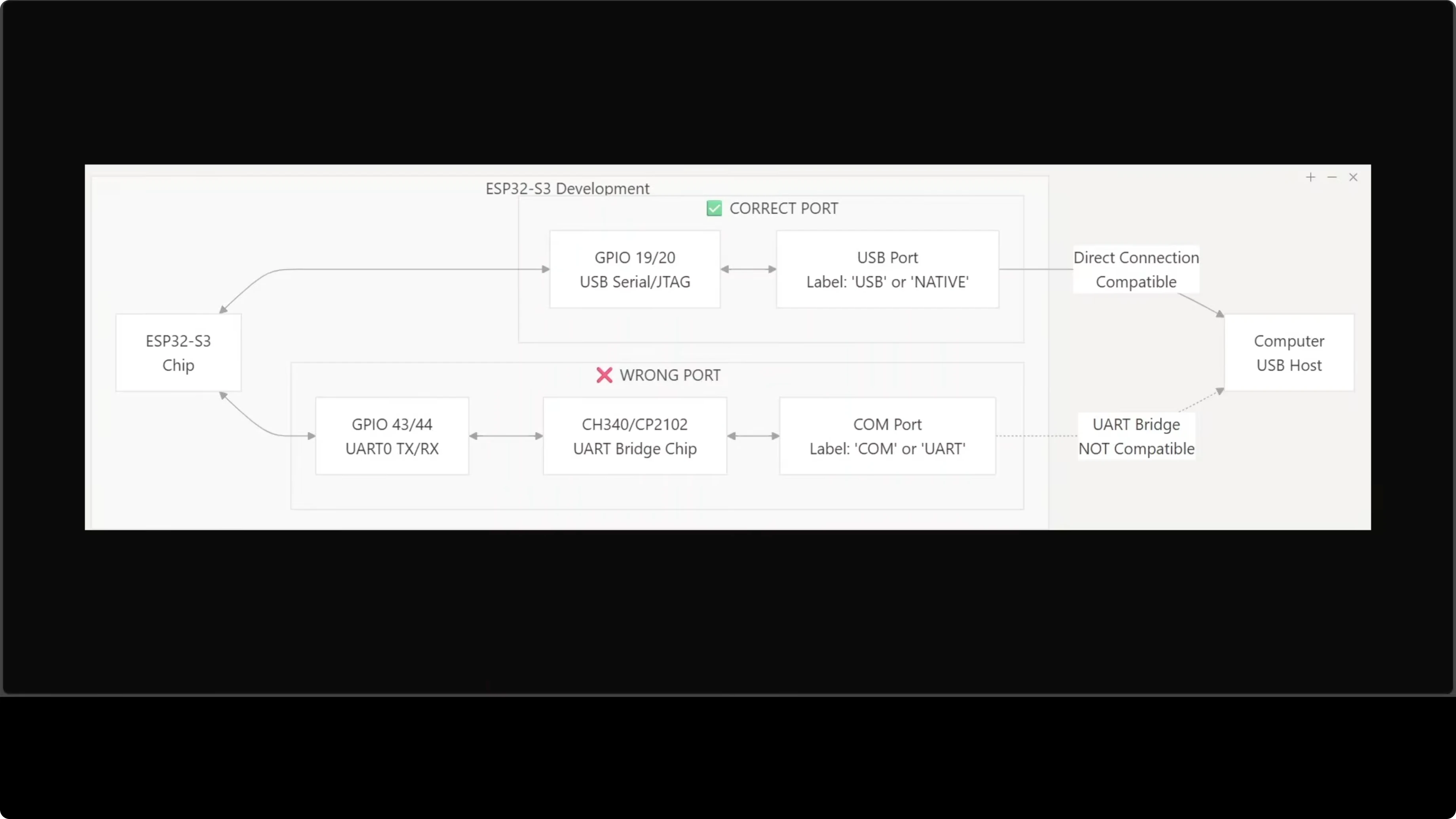
Most ESP32-S3 boards have two USB-C ports that are NOT interchangeable.
Use the one labeled USB or Native - it connects to the chip's built-in USB-Serial/JTAG interface.
The port labeled COM or U routes through an external bridge chip. Flashing through it will fail with cryptic errors.
I learned this the hard way. Check your board carefully before connecting. Save yourself 30 minutes of debugging.
Explore My Projects
Check out what I'm building and the tech stack I use for AI automation.
Setup: ESP-IDF and First Flash
The setup has more steps than software-only OpenClaw installs. You need ESP-IDF 5.5+ (Espressif's development framework for ESP32 chips) on Ubuntu or macOS.
1. Install ESP-IDF
Follow Espressif's official guide. This installs the toolchain, compiler, and flashing utilities.
2. Clone MimiClaw and Configure Secrets
git clone https://github.com/openclaw/mimiclaw.git
cd mimiclaw
cp secrets.example secrets
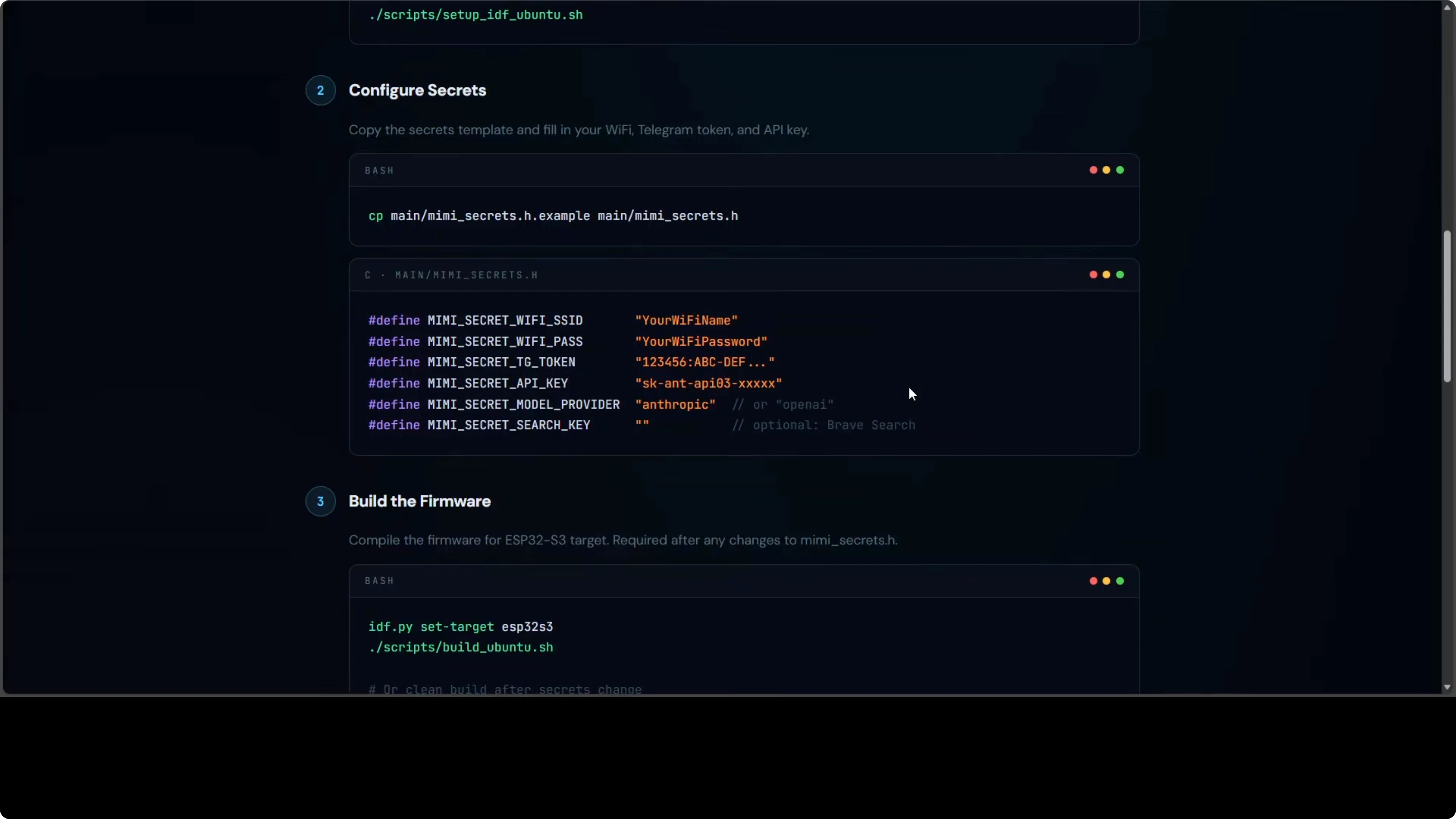
Edit secrets with your credentials:
WIFI_SSID="your-ssid"
WIFI_PASS="your-password"
TELEGRAM_BOT_TOKEN="123456:ABC..."
ANTHROPIC_API_KEY="sk-ant-..."
OPENAI_API_KEY="sk-proj-..."
PROVIDER="openai"  # or "anthropic"
MODEL="gpt-4o-mini"  # or Claude variant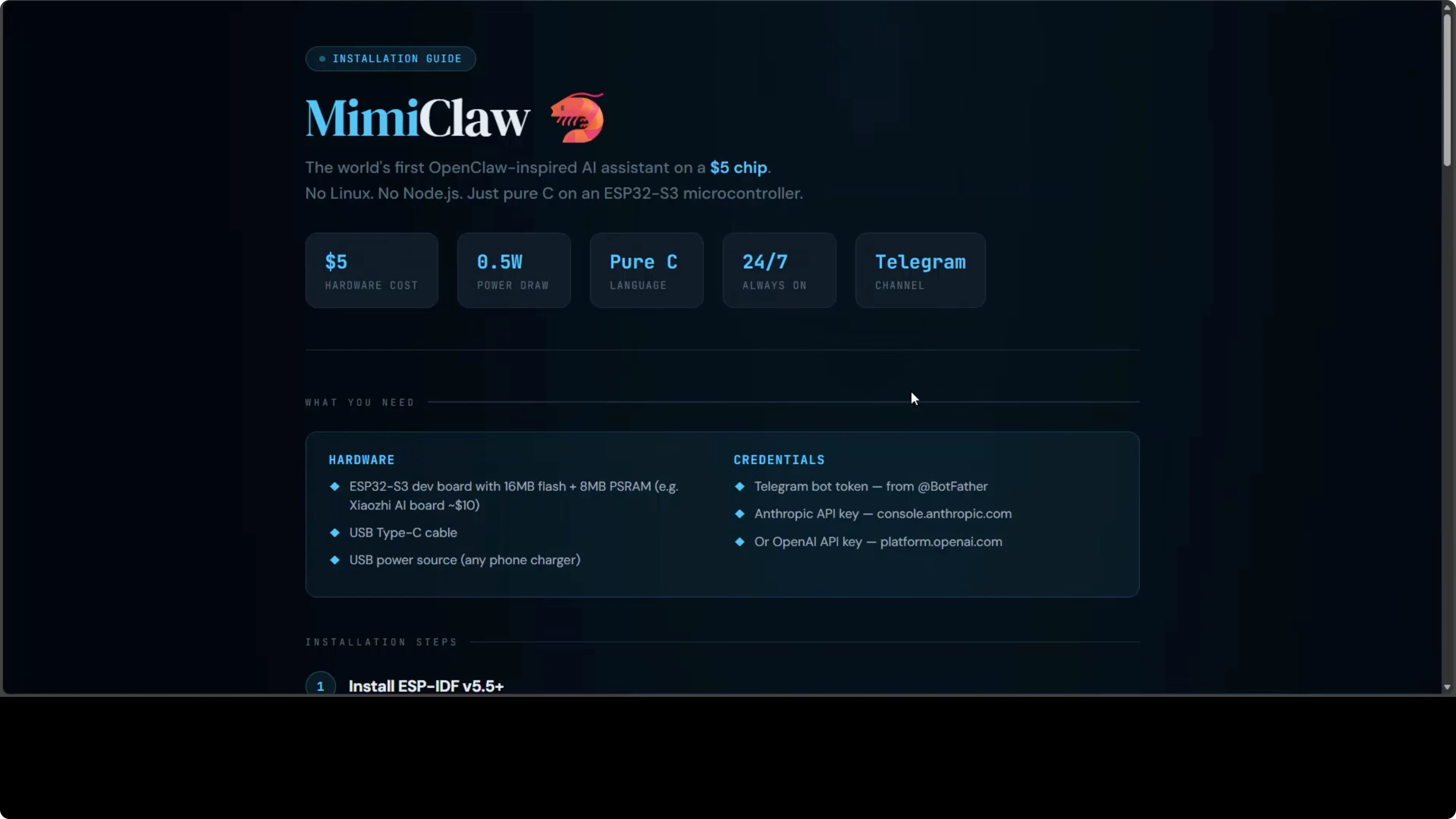
3. Build and Flash
idf.py set-target esp32s3
idf.py build
idf.py -p /dev/ttyACM0 flash monitor
Replace /dev/ttyACM0 with your USB port (check ls /dev/tty* on Linux/Mac or Device Manager on Windows).
The monitor command opens a serial console showing boot logs and the runtime CLI.
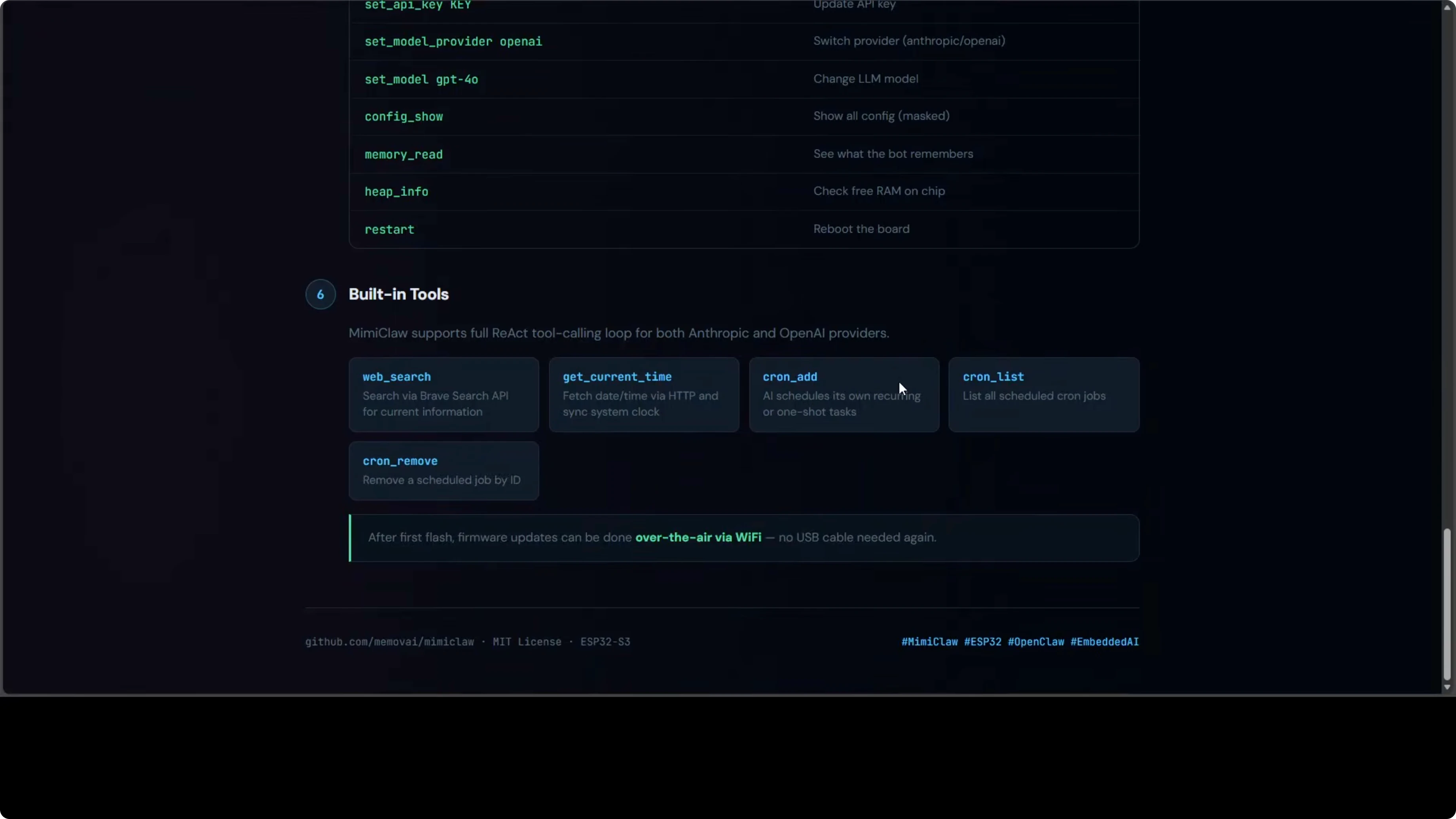
4. Runtime Configuration (Serial CLI)
After the first flash, you can change settings live without recompiling:
set wifi.ssid your-new-ssid
set wifi.pass your-new-password
set telegram.token 123456:ABC...
set provider anthropic
set api.key sk-ant-...
set model claude-sonnet-4
save
reboot
All config persists in NVS across reboots.
Picking the Right Board
Look for these specs:
- ESP32-S3 (not ESP32 - they're different chips)
- 16 MB flash (minimum for MimiClaw)
- 8 MB PSRAM (required for LLM buffers)
Some boards include extras like antennas, displays, or cameras. Not required, but they don't hurt.
Pricing varies by region and features. Expect $30-40 for a well-spec'd board.
Want to build AI automation?
I help businesses design and implement AI agent workflows tailored to their needs.
Cloud Model Reality Check
The hardware is cheap. The board runs on pocket change. But you still need an LLM API key.
MimiClaw supports:
- Anthropic Claude (Sonnet, Opus, Haiku)
- OpenAI GPT (4o, 4o-mini, o1)
Switchable at runtime via the serial CLI. The model runs in the cloud. The chip handles the agent loop, memory, and Telegram communication.
You pay for API calls even though the hardware cost is low. It's not a fully offline solution - but it's as close as you can get to a standalone AI assistant that fits in your pocket.
What You Can't Do (Yet)
MimiClaw is impressive, but it has limits:
No local LLMs. The ESP32 doesn't have the horsepower to run even small quantized models. Cloud APIs only.
No file uploads. Memory constraints mean no image analysis, no PDF processing, no large file handling.
No browser automation. The chip can't run Playwright or Puppeteer. Tool use is limited to API calls and text processing.
Limited persistent storage. 9 MB SPIFFS is enough for conversation history and basic skills, but you can't store large datasets or build a RAG system.
For those workloads, stick with server-based OpenClaw. MimiClaw is for always-on, low-power, portable AI assistants with modest computational needs.
When to Use MimiClaw
Here's where it makes sense:
IoT AI assistants. Sensors, home automation, remote monitoring with natural language interfaces.
Portable personal assistants. A Telegram bot you can carry anywhere with internet access.
Learning embedded AI. If you want to understand how AI agents work at the lowest level, this is the deepest dive.
Power-constrained environments. Solar-powered setups, battery-operated devices, edge deployments where every watt counts.
Prototyping hardware AI products. Test agent workflows on real embedded hardware before scaling.
It's not for everything. But when the use case fits, it's magical.
Final Thoughts
MimiClaw is the most radical member of the OpenClaw family. Pure C on an ESP32-S3 with no OS. Two cores split between networking and AI. A tight memory and flash layout that keeps everything persistent.
An always-on AI assistant sipping 0.5 watts and replying over Telegram is genuinely special.
It's not the most powerful OpenClaw setup. But it's the most portable, the most power-efficient, and the most fascinating from an engineering perspective.
If you've ever wondered how low you can go while still running a functional AI agent - this is the answer. A $5 chip with 240 MHz cores and 8 MB of RAM is enough.
The future of AI isn't just in data centers. It's also in your pocket, on your desk, embedded in devices you use every day. MimiClaw is a glimpse of that future.


