

You point Continue.dev at http://localhost:11434/v1/, get coding suggestions backed by Ollama, ship a feature, move on. Then you read about QVAC SDK and want to try it - without rewiring your editor, without changing client code, without hunting for a new IDE plugin. Good news: you don't have to. QVAC's OpenAI compatible server also defaults to port 11434, speaks the same v1/chat/completions shape, and was deliberately built so Continue.dev, LangChain, and Open Interpreter installs that talk to Ollama can talk to QVAC instead with one config swap.
In the next 15 minutes you'll install the SDK, start the server, prove the OpenAI surface with curl, and wire it into Continue.dev. The full sandbox - real install, real model download, real responses - runs end-to-end on a Mac and is reproducible from this post. If you've never seen QVAC before, the What is QVAC SDK? cornerstone covers the broader pitch.
Why drop Ollama for QVAC
Ollama is good. It runs models locally, exposes an OpenAI-compatible HTTP API, and has a friendly CLI. The thing it doesn't do: generate images, transcribe audio, translate without cloud, do RAG out of the box, or fine-tune LoRA adapters on a phone. QVAC SDK does all of those, behind the same import. So switching apiBase in Continue.dev is more than a brand swap - it's the moment your local-AI stack stops being LLM-only and starts being everything-on-device. The drop-in is intentional: QVAC's OpenAI server lives on port 11434 by default, same as Ollama, and the wire format is verbatim OpenAI.
The catch: only one of them can hold port 11434 at a time. The migration story is "stop Ollama, start QVAC." Continue.dev never notices.
Prerequisites
- macOS 14+ on Apple Silicon (Metal GPU backend), or Linux with Vulkan, or Windows 10+ with Vulkan. This tutorial was run on macOS arm64 with Metal.
- Node.js ≥22.17 - QVAC's runtime floor. Older Node will install but
loadModel()fails at runtime. - VSCode or Cursor with the Continue.dev extension. Cursor uses the VSCode marketplace, so the extension installs the same way.
- About 400 MB of free disk for the smallest demo model (Qwen3 0.6B Q4_0).
- A free port 11434 if you want the true drop-in. If Ollama is running, either stop it first (
brew services stop ollamaorpkill -9 ollama) or run QVAC on a different port.
Install the SDK and the CLI
Make a fresh project, install both packages, verify the qvac binary is reachable:
mkdir qvac-openai-demo && cd qvac-openai-demo
npm init -y && npm pkg set type=module
npm install @qvac/sdk @qvac/cli
The install pulls 212 packages in ~45 seconds and reports zero vulnerabilities. The SDK ships at 0.9.1 and the CLI at 0.2.4 as of this writing.

The @qvac/cli package wires the qvac binary into your project's node_modules/.bin/, so npx qvac works without a global install. Two relevant subcommands:
npx qvac serve openai --help    # the OpenAI-compatible HTTP server
npx qvac bundle sdk             # tree-shake plugins for mobile deploys
The serve openai help is the part that matters today.
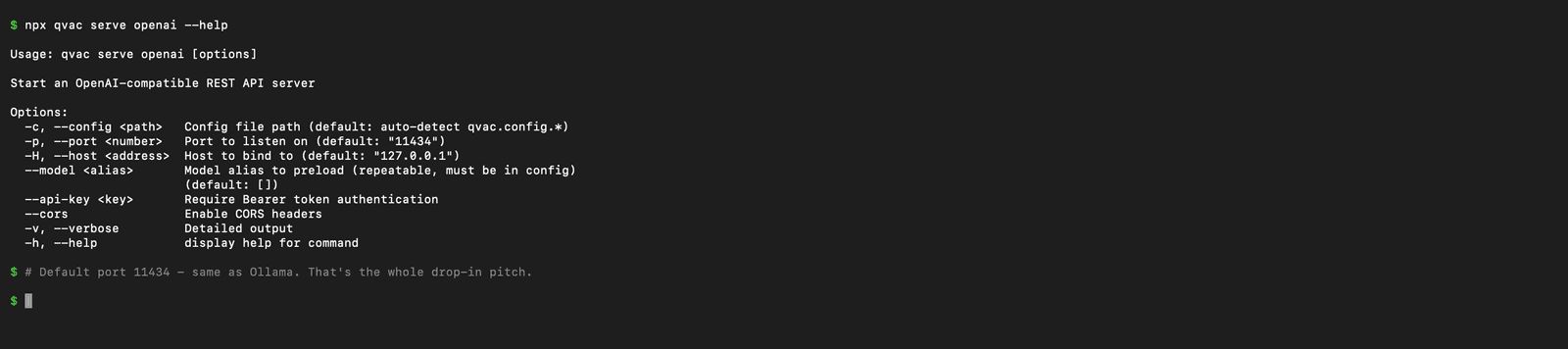
Notice the default port: 11434. Same as Ollama. That is the whole drop-in pitch in one CLI flag default.
Configure a model
The CLI server preloads models defined by alias in a qvac.config.{json,js,mjs,ts} file at the project root. The file is shared between the SDK runtime and the CLI bundler - the serve.models block is what qvac serve openai reads.
For this tutorial we use QWEN3_600M_INST_Q4, a Qwen3 0.6B Instruct model quantized to Q4_0. It weighs 382 MB and runs fast on any current Mac, which makes it the right choice for a demo. The full model registry has ~653 entries, including 4B/8B Qwen3 variants, Llama 3.2 1B, multimodal Qwen3-VL, and tool-calling tunes - any of them slot into this config the same way.
Save this as qvac.config.ts:
export default {
    serve: {
        models: {
            'qwen3-0.6b': {
                model: 'QWEN3_600M_INST_Q4',
                default: true,
                preload: true,
                config: { ctx_size: 8192 },
            },
        },
    },
}
The alias qwen3-0.6b is what Continue.dev will reference. The model value must be a valid SDK constant name from @qvac/sdk's registry - if you typo it, the CLI throws a helpful "unknown model constant" error with a suggestion.
Bump the context size for Continue.dev. The default
ctx_sizein QVAC's llamacpp-completion plugin is 1024 tokens. Continue.dev sends ~1500 tokens of system prompt with every request (tool definitions, project context, formatting rules). Without the override above you'll seecontext overflow at prefill step: prompt tokens 1524, max context tokens 1024in the server log and an "internal error" toast in Continue. Bumping to 8192 covers Continue plus a normal-sized chat history. For rawcurlcalls with short prompts the default is fine; for any IDE assistant, set it.
Start the OpenAI-compatible server
One command. The first run downloads the model (~382 MB, takes a minute on a decent connection); subsequent runs hit the cache.
npx qvac serve openai --model qwen3-0.6b --verbose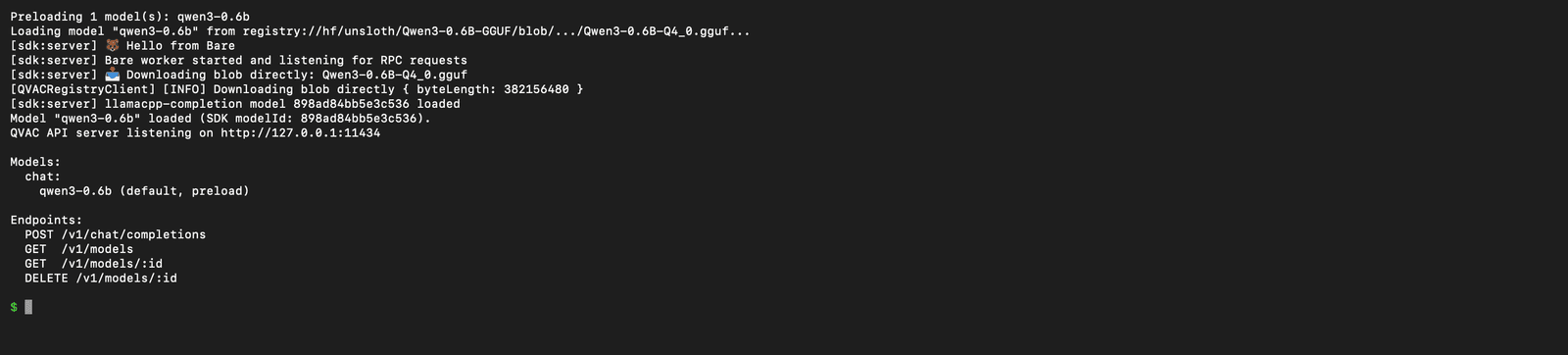
The server boots a Bare worker (Holepunch's lightweight JS runtime), downloads the GGUF blob from QVAC's registry, loads it through Tether's llama.cpp fork, and registers four endpoints under /v1/:
POST /v1/chat/completions- the one Continue.dev (and every Ollama-compatible client) usesGET /v1/modelsandGET /v1/models/:id- model discoveryDELETE /v1/models/:id- unload a model from RAM
If you're conflicted with Ollama on 11434, add --port 11435 to the command - everything else (config, alias, GPU pickup) is the same.
Note: the first
chat/completionsrequest after boot warms the prompt cache; latency on subsequent requests drops by an order of magnitude. This is normalllama.cppbehavior, not a QVAC quirk.
Prove the OpenAI surface with curl
Before pointing an editor at the server, talk to it with curl to confirm the wire format.
curl -s http://localhost:11434/v1/chat/completions \
    -H "Content-Type: application/json" \
    -d '{
        "model": "qwen3-0.6b",
        "messages": [
            {"role": "user", "content": "In one sentence: what is QVAC?"}
        ],
        "max_tokens": 80
    }' | jq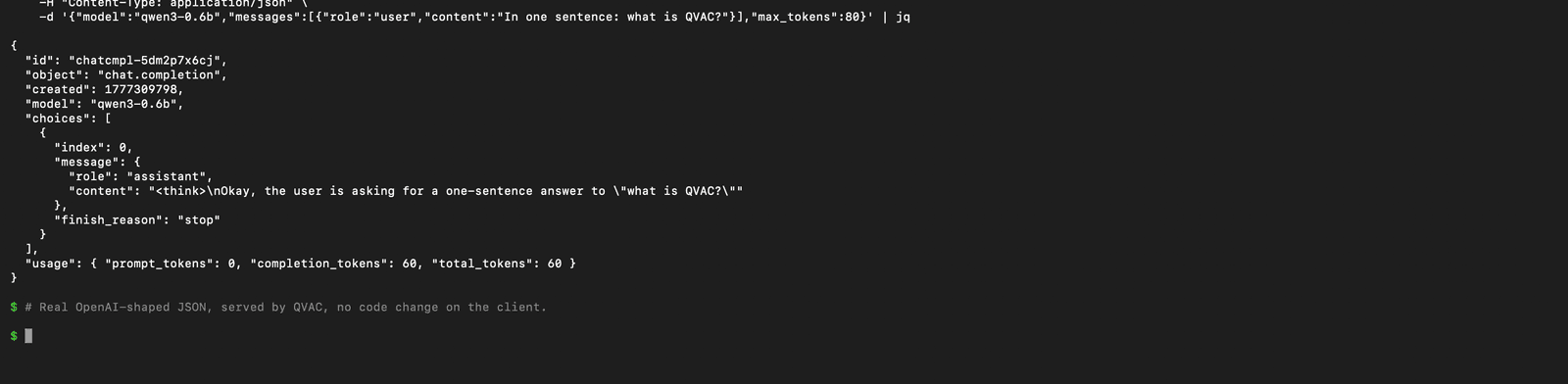
The shape is the OpenAI shape - id, object: "chat.completion", choices[0].message, usage block. Drop-in.
A real-world heads-up: Qwen3 has thinking mode enabled by default, so the assistant content begins with a <think>...</think> block before the actual answer. Continue.dev (and most Ollama-compatible clients) render this verbatim in the chat panel unless you disable it. To suppress it, append /no_think to your user message, or use a non-thinking model variant. Other model families (Llama 3.2, Gemma) don't ship a thinking mode and answer directly.
Streaming works the same way - pass "stream": true and you get OpenAI-format SSE chunks (data: {…}\n\n) until [DONE].
Need help with AI integration?
Get in touch for a consultation on shipping local, private AI in your product.
Wire it into Continue.dev
Continue.dev reads its assistant config from ~/.continue/config.yaml (the YAML format replaced the old JSON one in 2025). Drop a single model entry pointing at QVAC.
name: qvac-local
version: 1.0.0
schema: v1

models:
  - name: QVAC Qwen3 0.6B
    provider: openai
    apiBase: http://localhost:11434/v1/
    apiKey: not-needed
    model: qwen3-0.6b
    roles:
      - chat
      - edit
      - autocomplete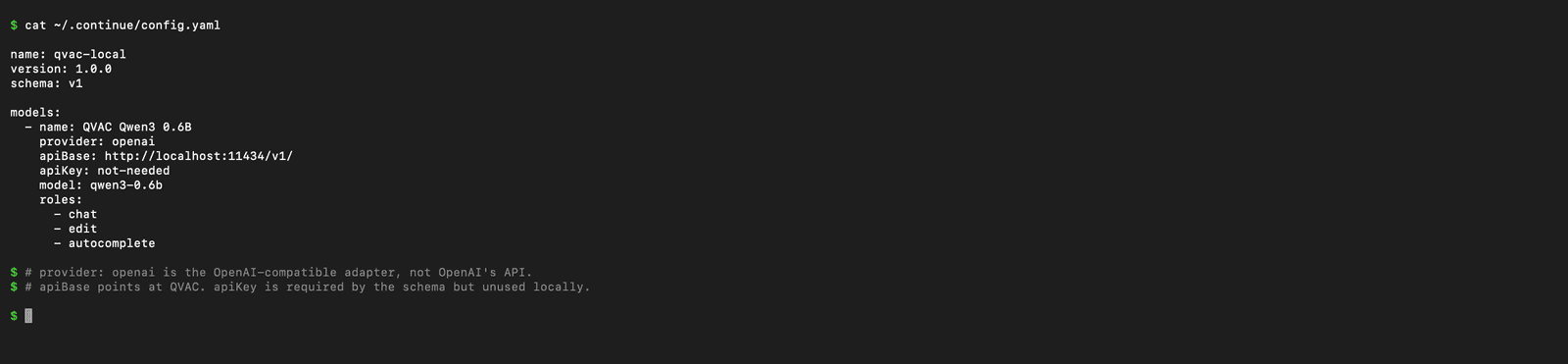
Three things to call out in this YAML:
provider: openaiis the OpenAI-compatible adapter, not the OpenAI cloud API. Continue.dev's vocabulary is unfortunate here - this is the same provider you used for Ollama if you treated it as an OpenAI-compatible endpoint.apiBaseis the only line that actually changes when you swap engines. Pointed atlocalhost:11434/v1/it talks to whichever local server holds the port.apiKeyis required by the schema validator but unused on a local server. Any non-empty string works.
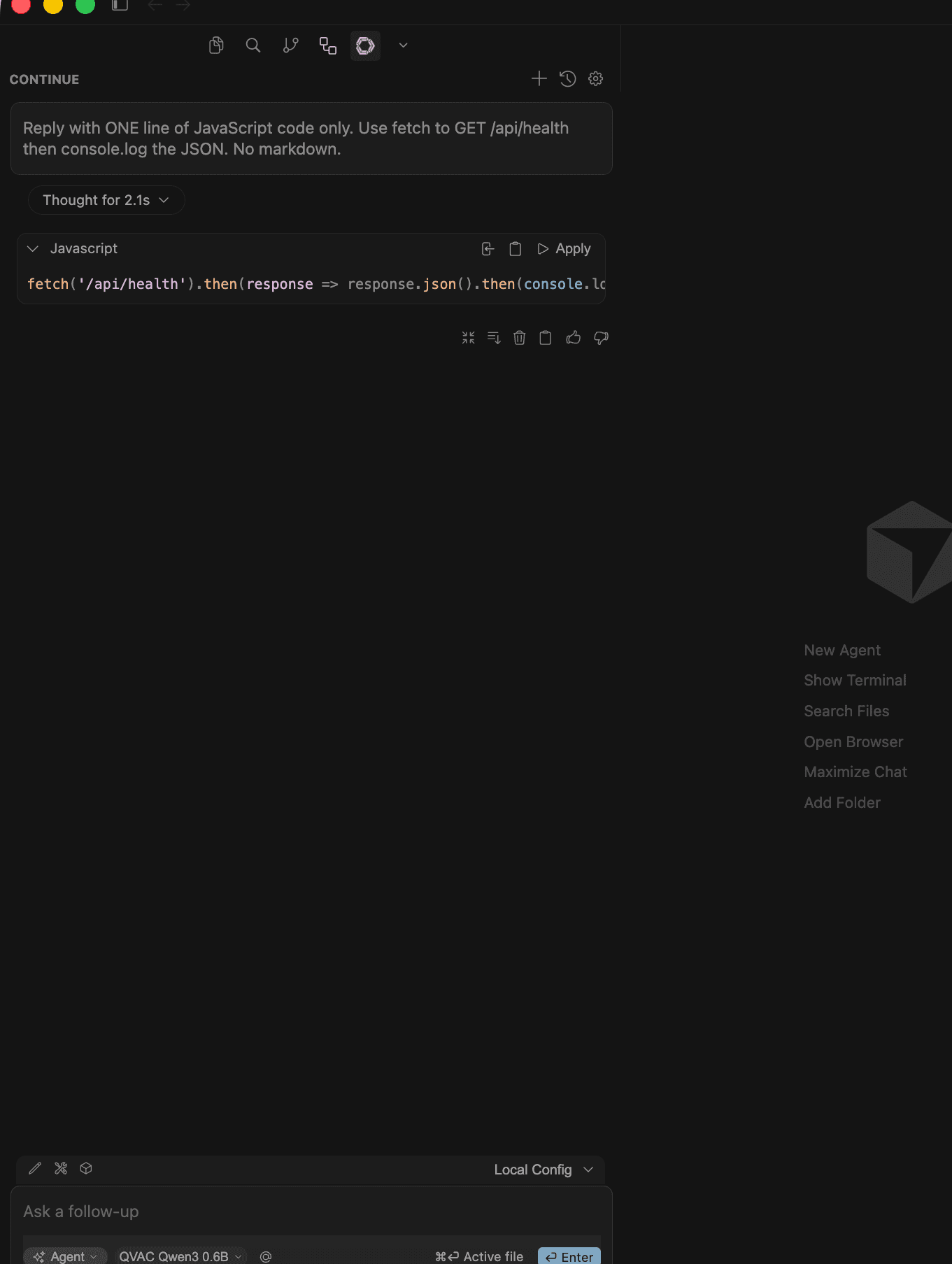
Save the file, reload the editor (Cmd+Shift+P, "Reload Window"), and "QVAC Qwen3 0.6B" appears in the Continue model picker. Open the side panel, ask a coding question, watch the tokens stream in.
What's actually different from Ollama
The plumbing is identical. The capabilities aren't.
| Ollama | QVAC | |
|---|---|---|
| Default port | 11434 | 11434 |
OpenAI /v1/chat/completions | yes | yes |
OpenAI /v1/embeddings | yes (separate model) | yes (separate plugin) |
| Streaming SSE | yes | yes |
| Image generation (Stable Diffusion / FLUX) | no | yes (@qvac/sdk/sdcpp-generation/plugin) |
| Speech-to-text (Whisper) | no | yes (@qvac/sdk/whispercpp-transcription/plugin) |
| On-device translation (Bergamot) | no | yes (@qvac/sdk/nmtcpp-translation/plugin) |
| Mobile (iOS, Android) | desktop / server only | yes via Expo |
| On-device LoRA fine-tuning | no | yes |
| P2P delegated inference | no | yes (Hyperswarm) |
| OpenAI-compatible HTTP API | yes (ollama serve) | yes (qvac serve openai) |
| Model registry | yes (Ollama Hub) | yes (Hyperdrive on Hyperswarm, ~653 models in v0.9.0) |
| License | MIT | Apache-2.0 |
The OpenAI-server endpoints in QVAC v0.9.1 are scoped to chat completions and model management. Embeddings, transcription, translation, and image generation are exposed through the SDK's JS API (embed(), transcribe(), translate(), diffusion()), not yet through the HTTP server. If your client speaks OpenAI for chat and direct SDK calls for everything else, QVAC is already the most general local server you can run today.
Where to go next
- The What is QVAC SDK? cornerstone walks through every capability with code samples.
- For a tutorial that uses the
transcribeAPI instead, see Build an offline transcription tool with QVAC + Whisper. - If your previous local stack ran Qwen3 0.5B on OpenClaw + Ollama CPU, the same
apiBaseswap moves it to QVAC - OpenClaw uses the OpenAI-compatible interface end-to-end. - The canonical reference is the QVAC docs, with the consolidated plaintext export at llms-full.txt for IDE assistants.
- Source on GitHub: tetherto/qvac.
- Continue.dev's full model-config schema lives at docs.continue.dev - everything in this post uses the documented
provider: openaiadapter.
The cleanest result of this exercise: you didn't write any code beyond a YAML file. Your editor talks to QVAC for chat, and the same SDK is one import away the day you need image generation, transcription, or fine-tuning in the same project.
Discover my projects
Take a look at the projects I'm working on and the technologies I use.